Agent Studio · QA

Nothing ships broken.

QA reads your whole campaign the way your most thorough colleague would, ranks what it finds worst first, and drafts the fix. You approve every change before anything touches your platform.

Agents do the work. You approve every move.

Live on: Oracle Eloqua Adobe Marketo
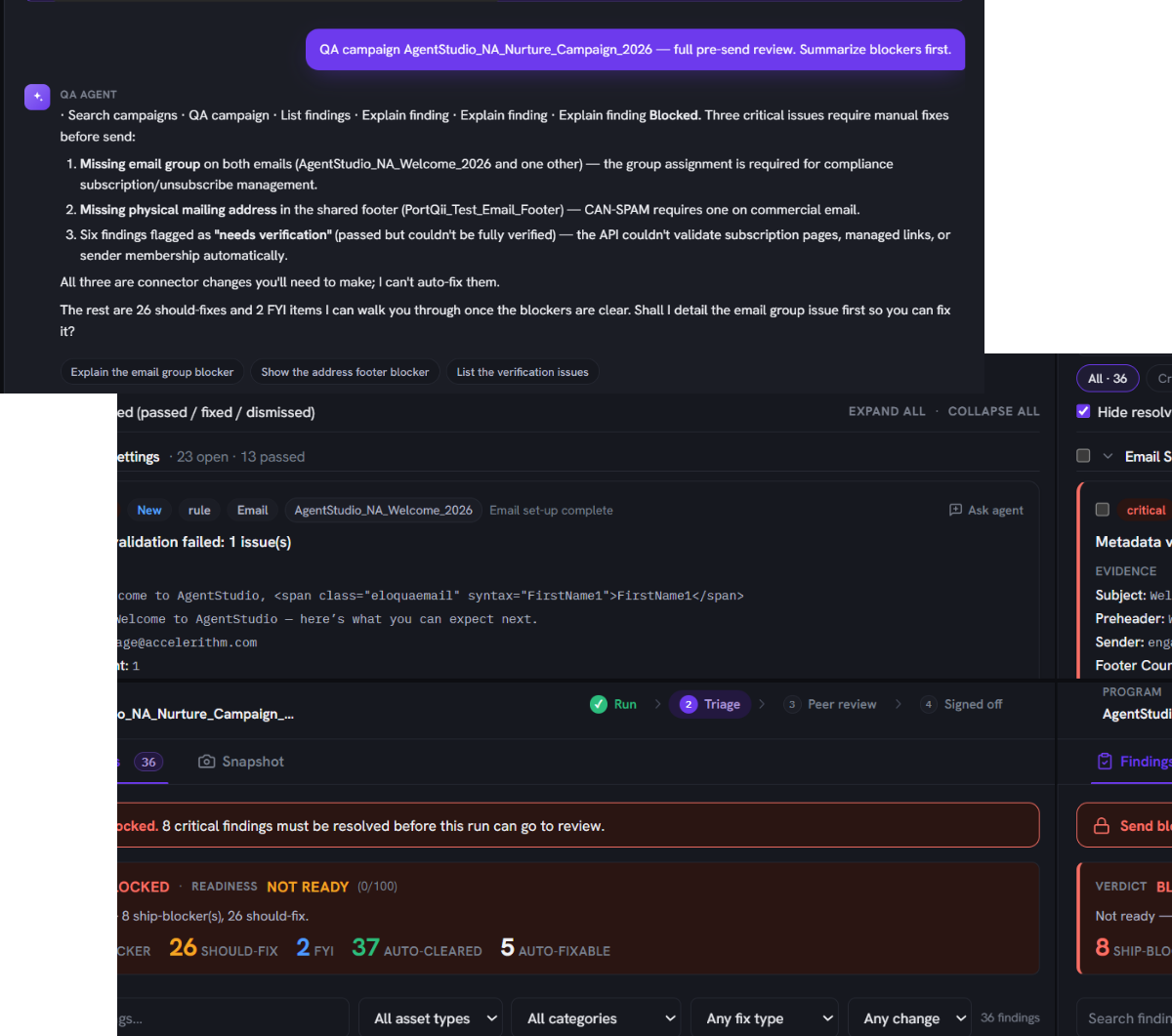
The QA agent reviewing an Eloqua campaign: a blocked verdict with a not-ready readiness score, findings grouped into ship-blockers, should-fix and FYI, and a per-finding view showing the issue, its evidence and a suggested fix.

What QA Does

Describe the campaign. Read one verdict. Approve the fixes.

Ask it to QA the campaign

No checklist to pick. Just say which campaign.

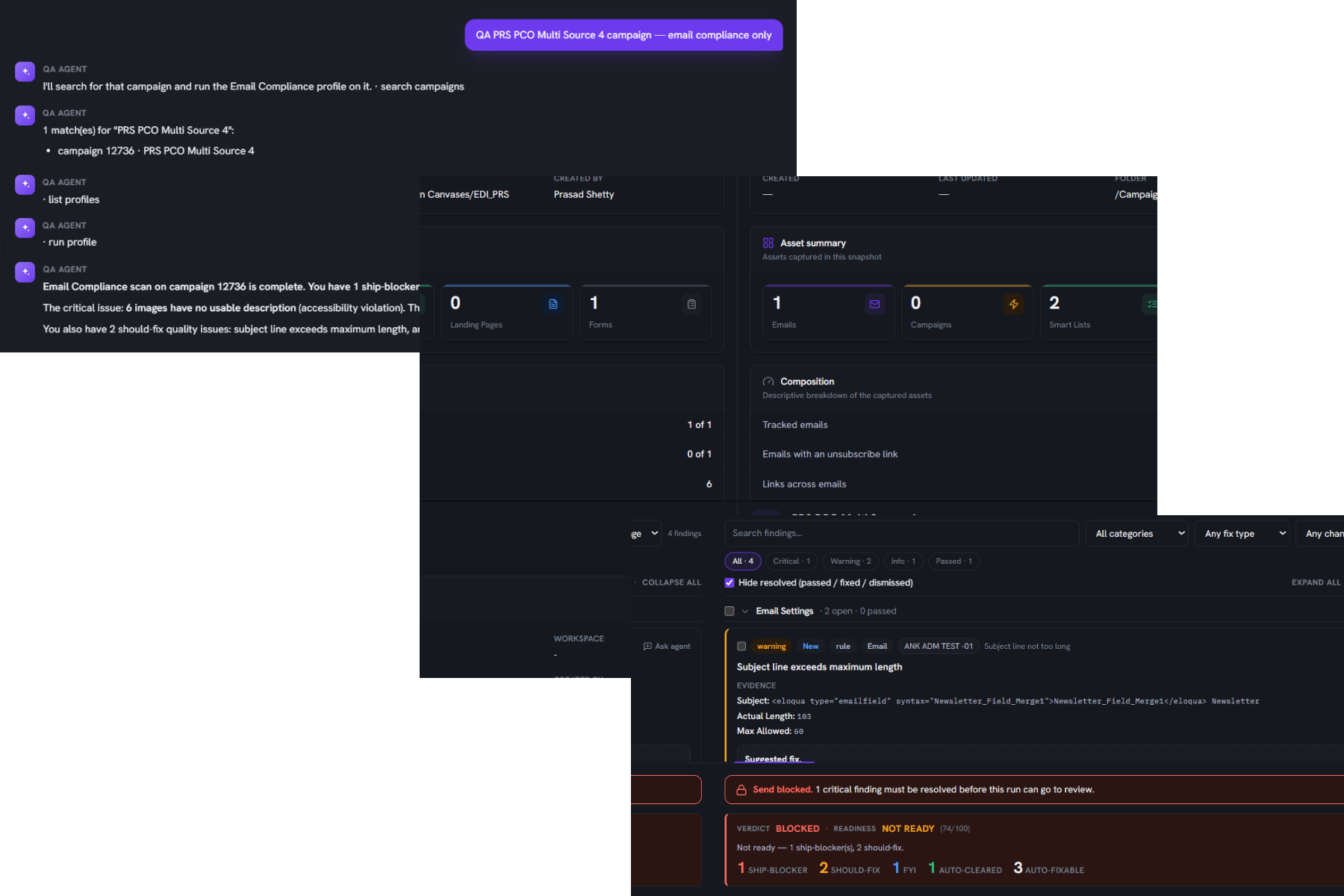
You name the campaign in plain English and the agent looks at what is actually inside it: emails, landing pages, forms, segments, imports, then runs the checks that matter for that mix. You never have to know which rule set applies. It also works on a single email or landing page when that is all you need.

Describing a campaign to the QA agent in plain language, for example asking it to QA the Q3 Webinar Nurture campaign, and the agent working out what is inside it before running the checks.

One ranked verdict, worst first

Know in five seconds whether this campaign can ship.

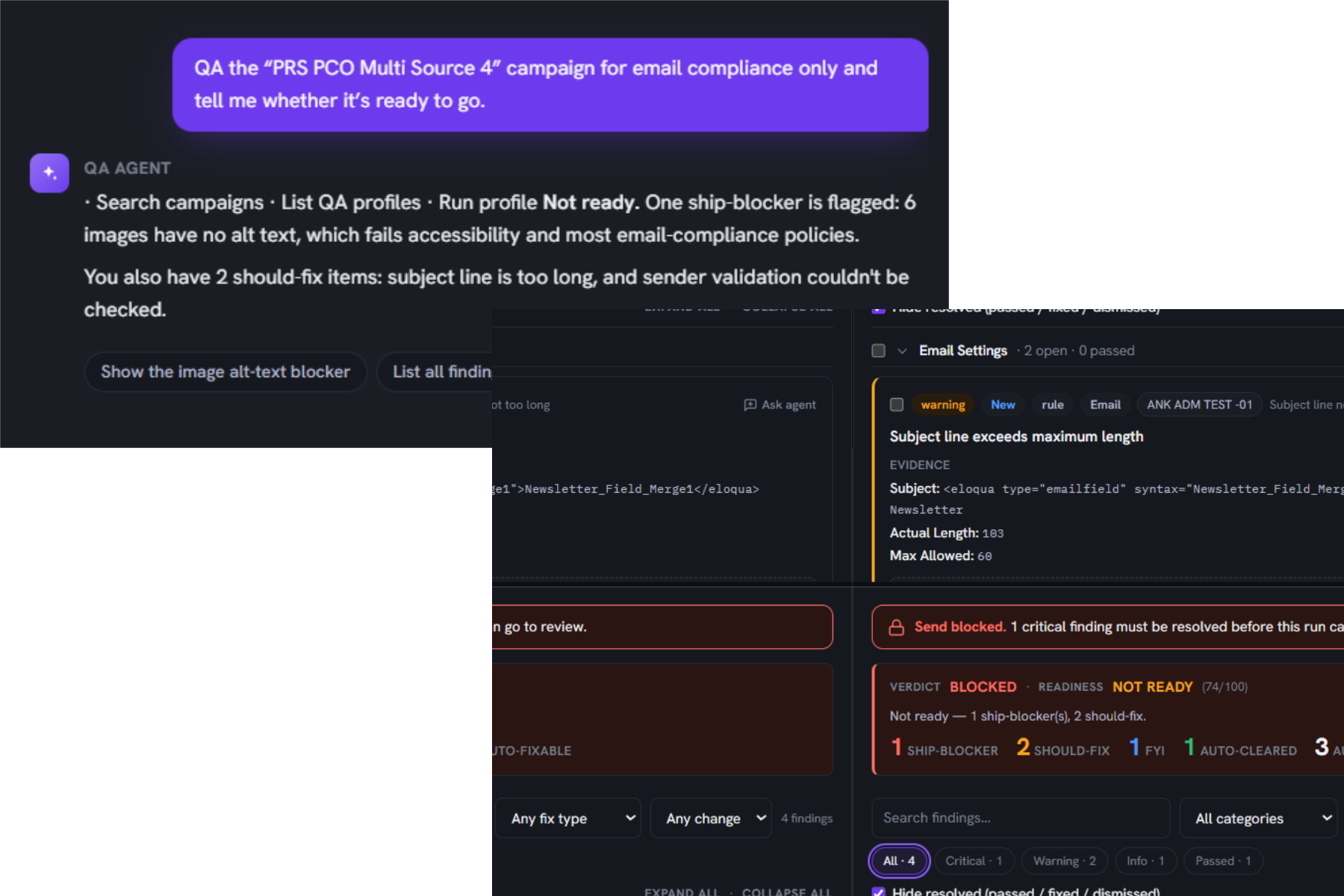
Findings are sorted into ship-blockers, should-fix, and FYI, each with a plain headline, the evidence behind it, and the recommended action. A check that failed to run counts against readiness rather than quietly passing, because a control that did not run cannot clear a send.

The QA verdict view for an Eloqua run: a blocked verdict with a readiness score, counts of ship-blockers, should-fix and FYI findings, and a finding that shows its evidence and a suggested fix.

Fixes you approve, line by line

The agent does the typing. You keep the decision.

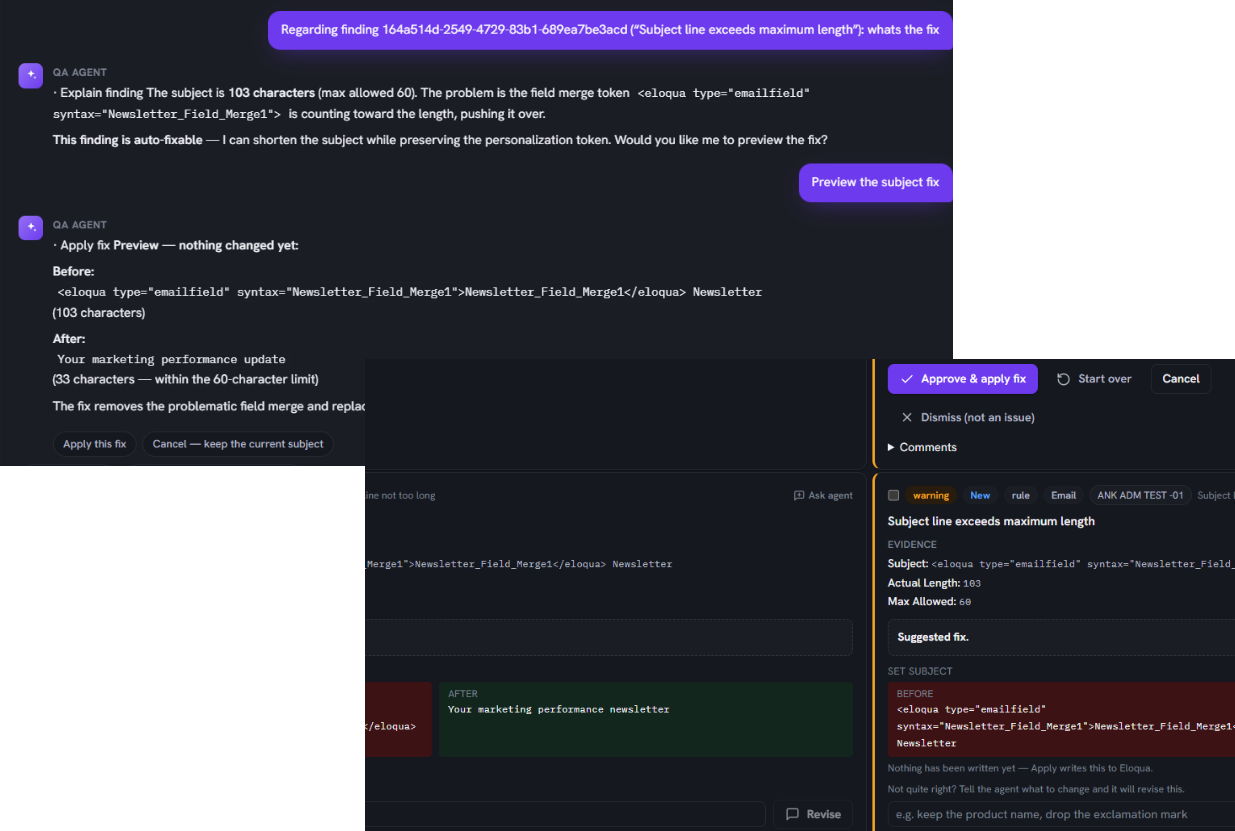
For eligible findings it drafts the corrected value, shows the exact before and after, and writes only after you confirm. If the draft is not right, tell it why and it revises. Every applied fix is recorded with its original value, and re-running the QA labels each finding fixed, carried over, new, or regressed so you can see the change land.

A governed fix showing the drafted corrected value with the exact before and after, applied only after the reviewer approves it and recorded with its original value.

Review, sign-off, and an audit trail

Approvals that hold up when someone asks.

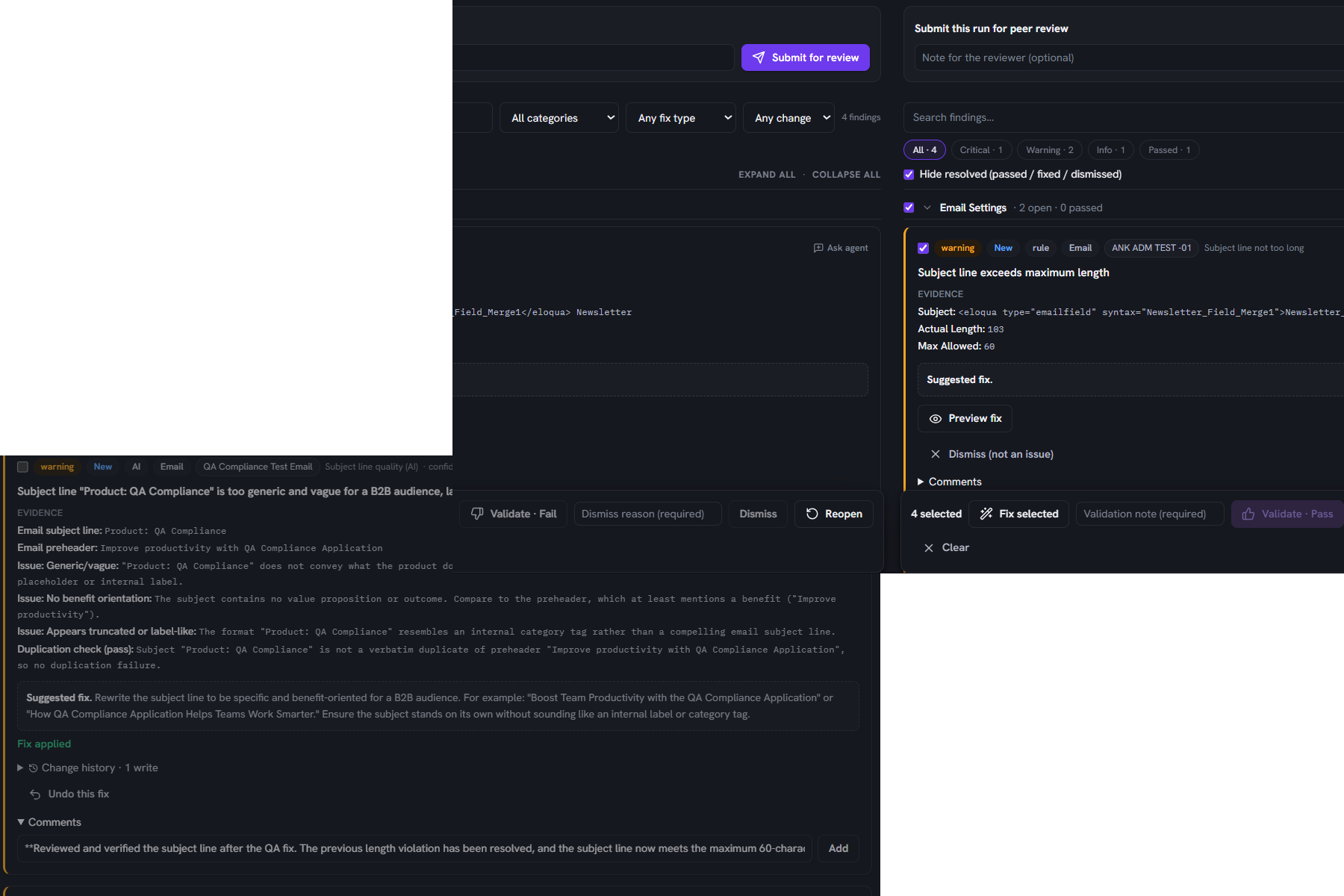
A run moves from your own review to a peer reviewer, who signs it off or returns it with a reason and per-finding notes. With separation of duties turned on, the person who submitted a run cannot sign it off; a second reviewer has to. Every submit, comment, fix, and sign-off is recorded with who and when, and both the run and the audit log export to CSV.

A run moving from self-review to a peer reviewer who signs it off or returns it with a reason, with separation of duties enforced and every submit, comment, fix and sign-off recorded with who and when in an exportable audit trail.

Checks that know your standards

It judges your campaigns against your rules, not generic ones.

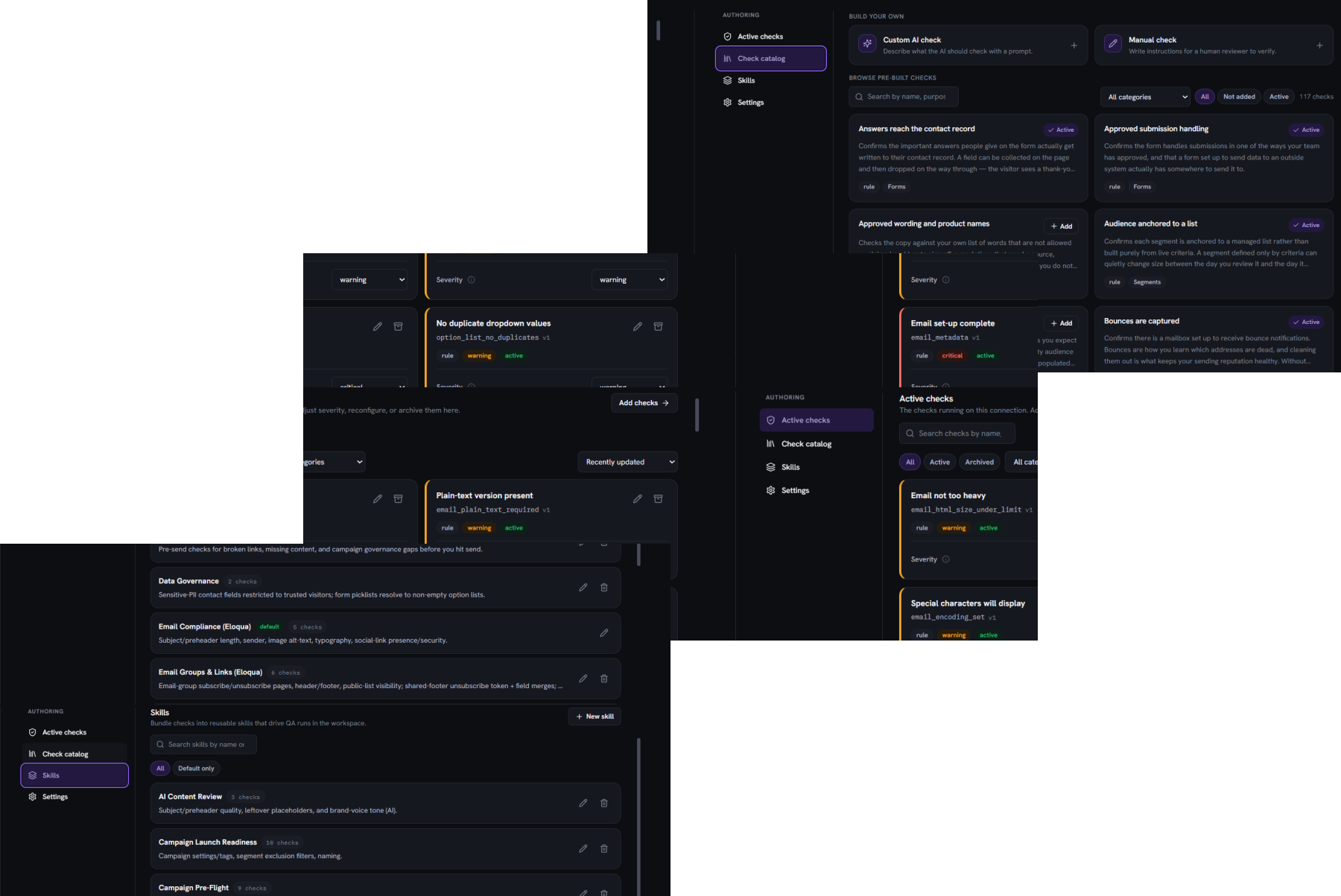
Once you record your naming convention, brand voice, sender policy, suppression rules, and compliance requirements, the checks use them. The naming check reads your convention, the tone check reads your voice, and the campaign coherence check reads your own tag taxonomy instead of guessing. Every finding shows which of your rules it came from.

Checks running against your own standards: your naming convention, brand voice, sender policy, suppression rules and compliance requirements, with each finding showing which of your rules it came from.

What it catches

Out of the box, it already knows what to look for

50+
ready-to-use checks spanning the whole campaign, from emails and landing pages to forms, segments, and the set-up itself. Live from your first run, with nothing to configure.
Compliance blockers
Missing unsubscribe links, absent physical addresses, and the other CAN-SPAM misses that turn into fines, caught before the send instead of after.
Silent breakers
Broken links, unresolved personalization tokens, wrong sender details, and audiences sent with no suppression list.

Why pre-send QA matters

The errors QA catches are the ones regulators fine

A missing unsubscribe link or physical address is not a small slip once an email is out. Under the CAN-SPAM Act it is a per-email liability, and enforcement is real and recent.

$53,088

Maximum civil penalty per individual email that violates the CAN-SPAM Act, for example one missing a working unsubscribe link or a valid physical postal address.

Source: U.S. Federal Trade Commission, CAN-SPAM Act: A Compliance Guide for Business.

$2.95M

The largest CAN-SPAM penalty the FTC has obtained, settled in 2024, for commercial emails that failed to offer an opt-out and left out a physical postal address.

Source: U.S. Federal Trade Commission, FTC action against Verkada, August 2024.

How it works

From request to sign-off

1

Describe

Ask in plain English, for example "QA the Q3 Webinar Nurture campaign". The agent pulls it from your connected platform and works out what is inside before it starts.

2

Propose

Minutes later you have one ranked verdict and a readiness score, with a drafted fix already waiting on every issue the agent can correct.

3

Approve

Approve the fixes you want, redraft any you do not, then send the clean run on for peer review and sign-off.

Two things are specific to QA

The loop is built to be re-run. Run it again after fixing and every finding is labelled new, carried over, fixed, or regressed against the previous run, so you see progress rather than re-reading the whole list.

Reading is free and writing is not. Scanning, ranking, and drafting never change anything in your platform. Only an explicit confirmation writes, and even then the agent re-checks that the asset has not changed since it read it before saving.

Trust and security

Governed by design, not by good intentions

  • SOC 2 Type II. Independently audited controls for security and availability.
  • Does not store PII. The agent reads what it needs to run a check and does not retain personal data.
  • The agent proposes, a human approves. Nothing is written to a live system until you confirm it.
  • Works across Eloqua and Marketo today. One standard, on both platforms your team already uses.
  • Oracle, Adobe, and HubSpot partner. Built alongside the platforms it runs on.

Governance for QA

Governance is enforced by the server, not just hidden in the interface. Every write is recorded in a ledger that keeps the original value, and both the run and the full audit trail export to CSV for compliance and forensics. Applying fixes can be turned off per connection, so a team can run the agent in recommendations-only mode where it flags and drafts but never writes. And separation of duties can be switched on so the person who submits a run cannot sign it off.

SOC 2 compliant Oracle Eloqua technology partner Adobe solutions partner HubSpot solutions partner

Questions, answered

What buyers ask about QA

Does QA change anything in my platform without me approving it?

No. QA reads your campaign, ranks the findings, and drafts corrected values, but it writes only after you confirm each change, and bulk fixes are confirmed too. You can also run it in recommendations-only mode per connection, where it flags and drafts but never writes.

Can I add my own checks, or am I stuck with the ones you ship?

You can build your own checks on top of the library. Pick a check from the catalog and set its parameters, write a custom AI check by describing what correct looks like for your brand, or add a manual check for judgment calls. Group them into named profiles so different campaign types are held to the right standard.

AI-powered checks need an AI client configured on your account. Without it, they are skipped rather than failed.

Can I run QA on a single email, or does it have to be a whole campaign?

Either. Point it at a full campaign and it works out everything inside, from emails and landing pages to forms, segments, and imports, then runs the checks that apply. Or point it at a single email or landing page when that is all you need to clear.

Who can sign off a campaign, and is that recorded?

A completed run goes to a peer reviewer, who signs it off or returns it with a reason and per-finding notes. With separation of duties enabled, the server prevents anyone from signing off their own submission. Every submit, comment, fix, and sign-off is recorded, and both the run and the audit log export to CSV.

Peer review and sign-off availability depends on your plan.

What happens if a fix turns out to be wrong?

Every applied fix is logged with its original value, so you always have a record of exactly what changed. Re-running the QA labels each finding fixed, carried over, new, or regressed against the previous run, so you can see whether the change landed and revisit anything that regressed.

Catch every issue before your audience does.

Bring one of your own campaigns to the demo. We'll run the QA Agent on it live in your Oracle Eloqua or Adobe Marketo setup, walk through the issues it finds ranked worst first, and show how it drafts each fix for you to approve before anything goes live.