Agent Studio · the Naming agent

Stop fixing naming after the campaign is live.

Your naming standard exists, but consistency slips the moment people create assets. Naming is the Agent Studio agent that brings your own convention into the work: users assemble the name from your standard, Naming validates it and prepares the create or rename, and nothing reaches Eloqua or Marketo until you approve.

Your convention. Your inputs. Your approval.

Live on: Oracle Eloqua Adobe Marketo
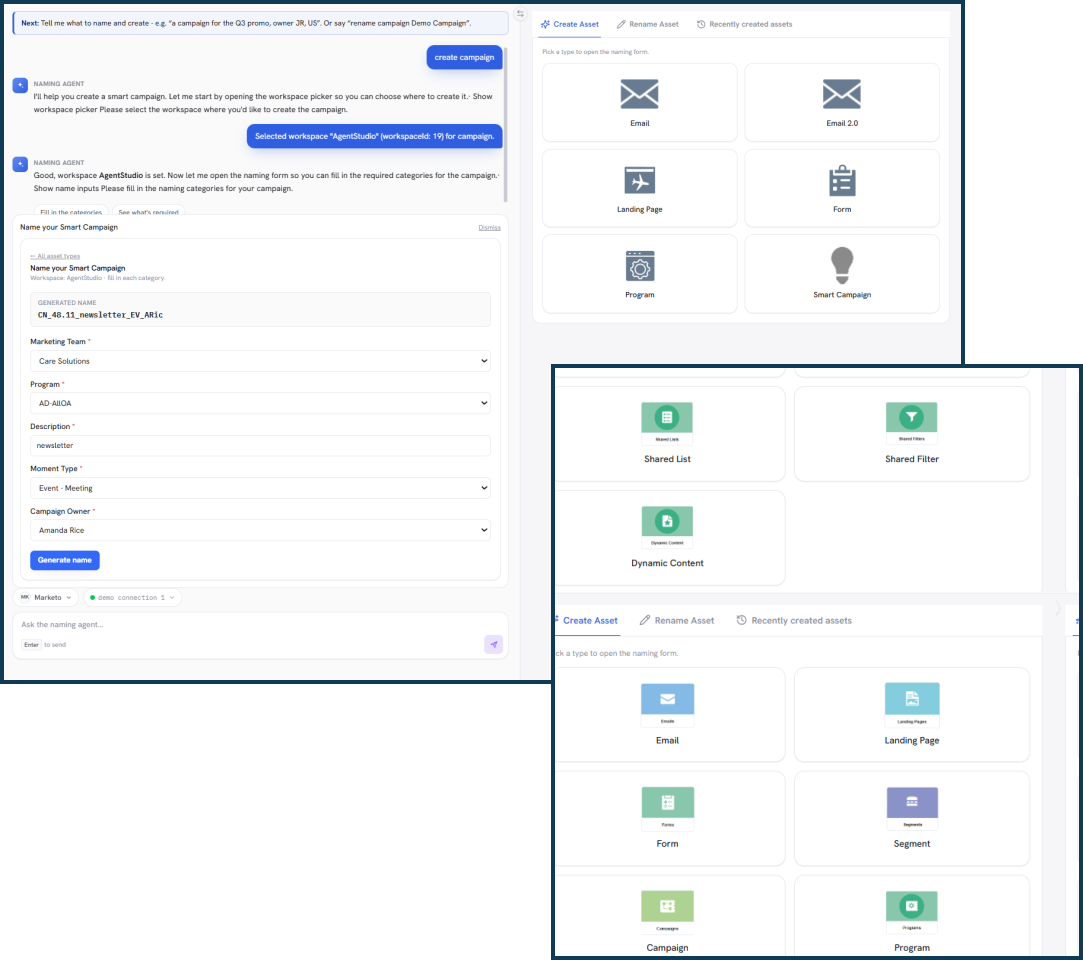
Naming creates on-standard assets — email, landing page, form, program and campaign — across Oracle Eloqua and Adobe Marketo, each named from your convention.

The problem

A standard in a document isn't a standard in the work

Most teams already have a naming convention. It lives in a doc. Execution still depends on people remembering it, field by field, asset by asset, at the busiest moment.

Your naming document

Tells people the rules.

<BusinessUnit>_<Language>_<Region>_<Campaign>_<Date>

Accurate, agreed, and completely dependent on everyone applying it perfectly, every time.

At the moment of creation

People improvise.

Q1 Promo Email FINAL_v3 corp-emea-promo-copy EMEA Q1 2026 (use this one)

The same campaign ends up written three different ways, and the cost lands later, on the people who have to report on it, attribute it, and find it. The fix isn't a longer document. It's putting the standard into the moment the asset is made.

The better way

Your standard, built into the work

Your organization owns the convention. Naming puts it where the work happens: users assemble names from your rules, the agent validates every one, and you approve before anything is written.

What people type

Q1 Promo Email Final_v3_USE_THIS

Your naming standard

Business Unit Language Region Campaign Date
You assemble · Naming validates

Preview, ready to approve

Corporate_EN_EMEA_Q1PROMO_2026
  • Convention-compliant
  • Correct asset structure
  • Waiting on your approval
1
Your organization

Define the standard

Set your categories, required values, field order, and vocabularies once. This is the convention Naming applies, not one it invents.

2
You

Assemble the name

Select the naming components for the asset. Naming validates the result against your standard and prepares the create or rename.

3
You

Review and approve

See the previewed name and asset, then approve. Only then does Naming write to your live Eloqua or Marketo instance.

A standard only works when it's part of the work.

A document tells people the rules. Naming brings them into the work, while the person doing it stays in control of the values and the final action.

What Naming does

One workflow: apply, assemble, validate, create or rename

The same story runs on Oracle Eloqua and Adobe Marketo, your convention, your inputs, the agent's validation, and your approval before anything is written.

Apply your convention

Your standard becomes part of the workflow.

Your organization defines the naming rules, the categories, their order, required values, and approved vocabularies. Naming reads that configured convention and puts it in front of the person creating the asset, so names come from the organization's standard, not from whoever happens to be working that day.

  • One convention for the whole team, so the standard survives turnover, agencies, and busy quarters.
  • New joiners follow the rules from day one, without memorizing a naming document.
  • Governance you set once and update centrally, not a policy people quietly drift from.
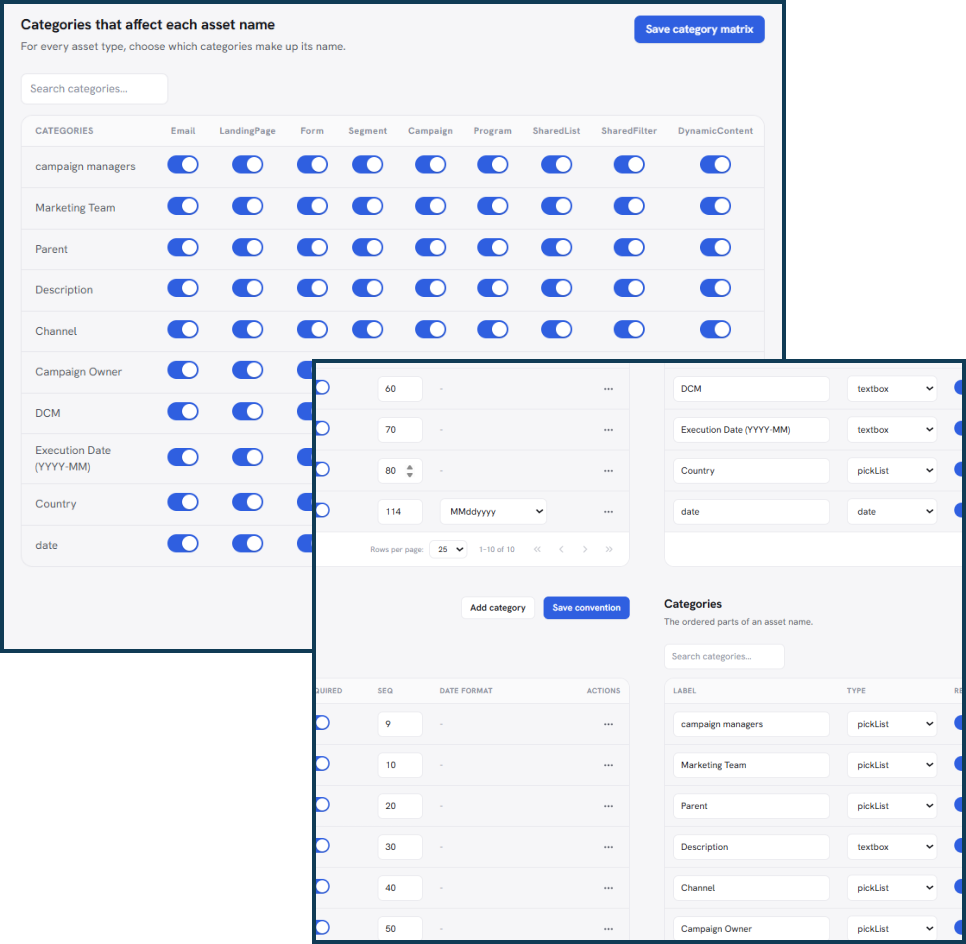
Apply The Naming Standards For Assets

Assemble + validate

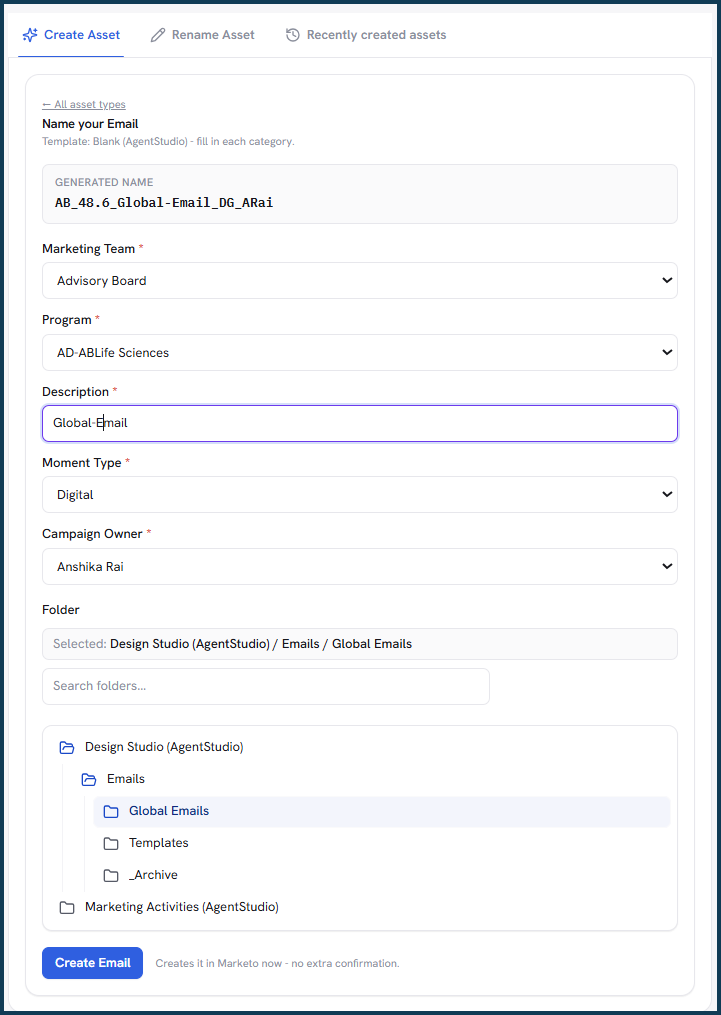
You select the components. Naming validates the result against your standard.

Pick the values for each category, business unit, language, region, campaign, date, and the name is assembled from your convention as you go. You provide the inputs; Naming keeps them in the order and format your standard requires.

Before anything is created, Naming checks the assembled name and flags exactly which rule it breaks, so a mistake is caught here instead of surfacing later in your grouping, attribution, and reports.

  • Errors are stopped at the source, before they multiply into hours of reporting cleanup.
  • Fewer naming reviews and correction threads, so campaigns move from idea to launch faster.
  • Confidence for every user that a name is right the moment it's saved.
Naming Assembles and Validates The Assets Name Against the Standards

Create or rename

New assets enter on standard, older ones are brought back to it.

Once you approve the name, Naming creates the real asset in Eloqua or Marketo, an email, landing page, form, program, or campaign, so nothing becomes a cleanup problem later.

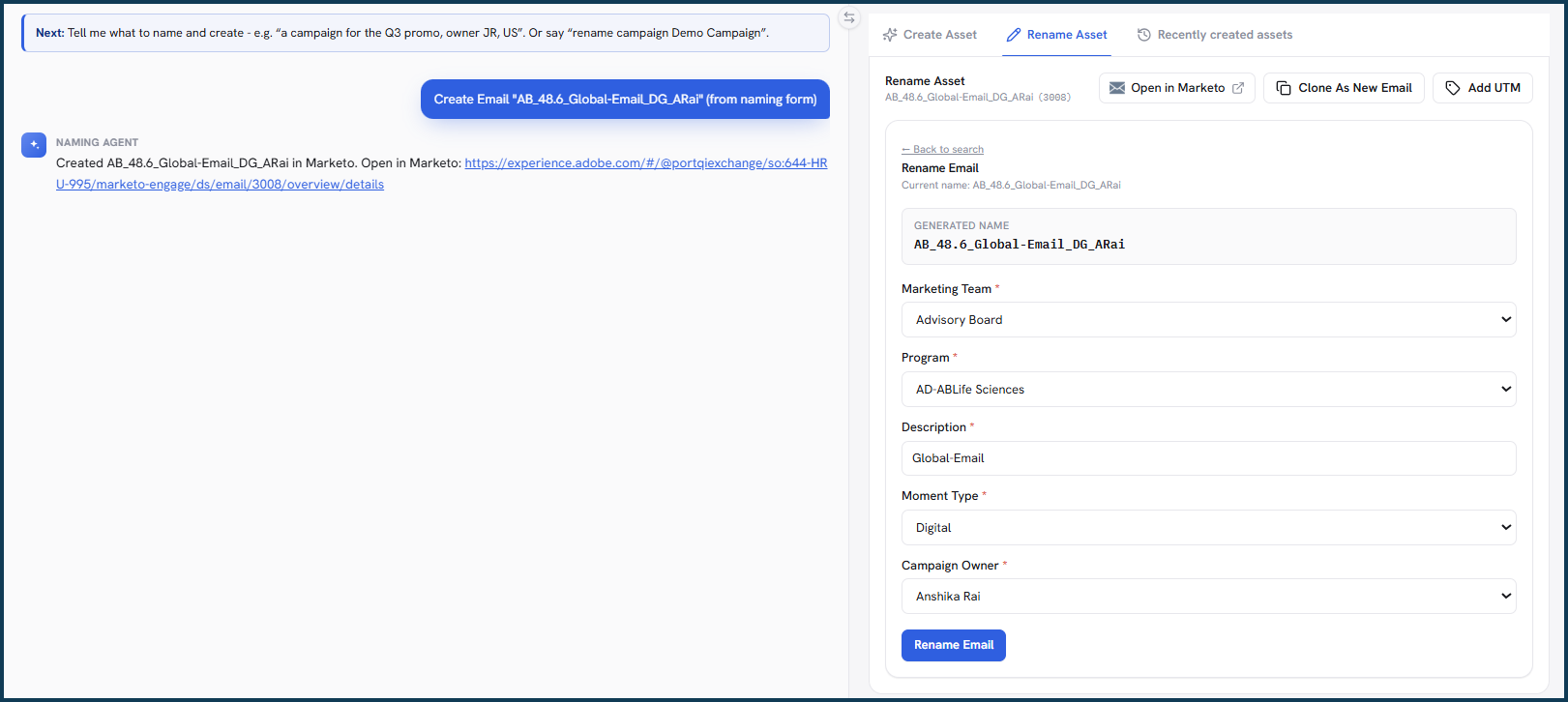
Existing inconsistency doesn't have to be permanent either. Point Naming at an asset already in your platform and it prepares a compliant name and previews the rename. Creating is confirm-gated and a rename happens only when you submit it, never silently or on its own.

  • Your instance stays clean as it grows, so cleanup never becomes a recurring project.
  • Years of inconsistent assets can be brought in line without a manual rename marathon.
  • Assets stay easy to find and group, so teams spend time on campaigns, not hunting.
Create or rename preview: create a new asset in Oracle Eloqua from an approved name, or rename an existing Marketo asset to the compliant name — each submitted only on your approval.
Marketo only

UTM tagging & tracking exports

Every new asset ships with tracking that matches its name.

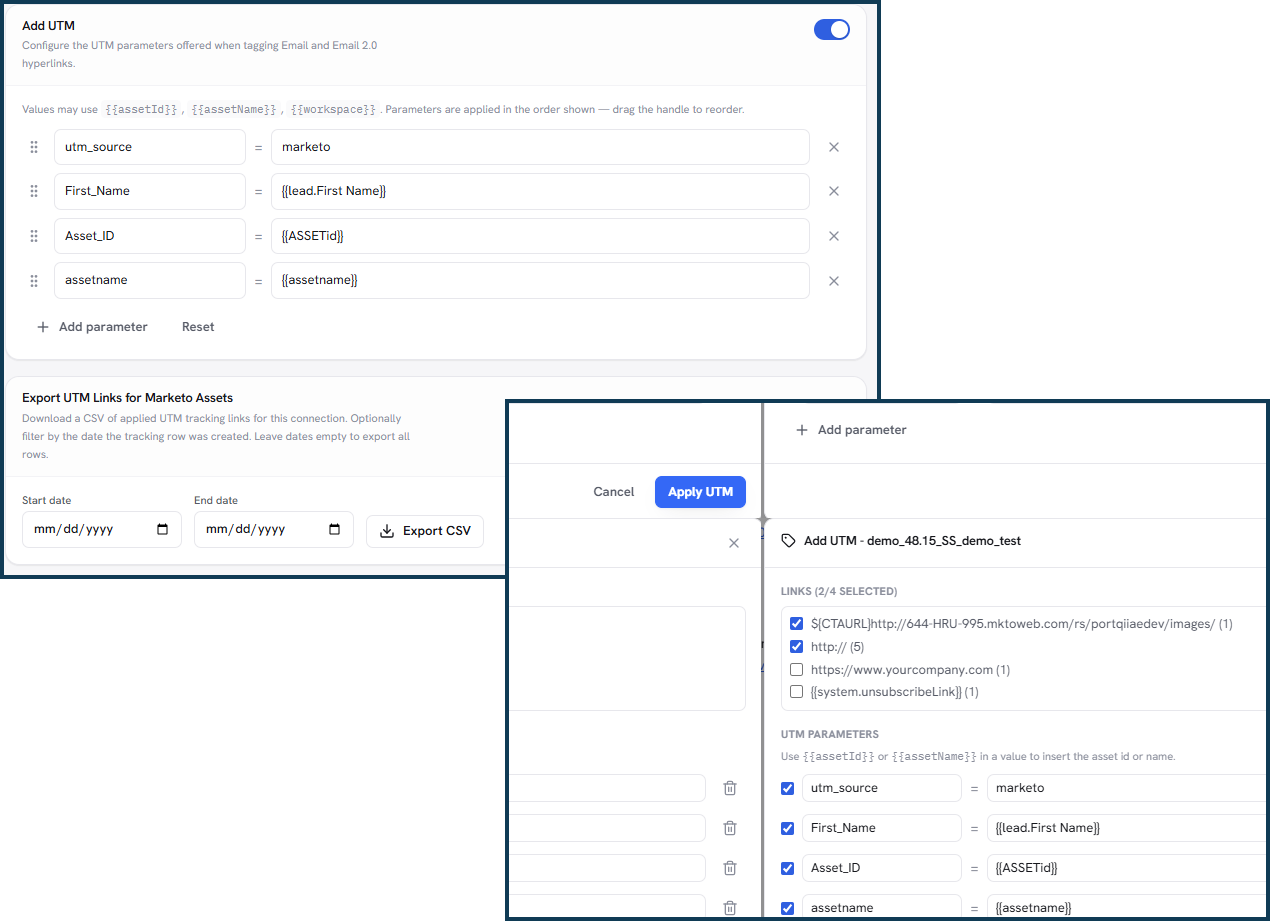
On Marketo, Naming tags each approved asset with UTM parameters drawn straight from its name, then hands your team a tracking and asset-creation export. Campaign tracking is set the moment the asset is made, not patched in afterward.

  • Attribution your analytics team can trust, because source and campaign values line up with the asset name.
  • No more hand-built tracking links, so campaigns launch faster and with fewer errors.
  • A ready record of what was created and how it's tracked, for reporting and audits.
Marketo UTM tagging and tracking export: utm_source, utm_medium and utm_campaign values drawn from the approved name, delivered as utm-tracking.csv and asset-creation-report.csv.
Eloqua only

Campaign-field & CDO write-back

The name and its reporting fields always tell the same story.

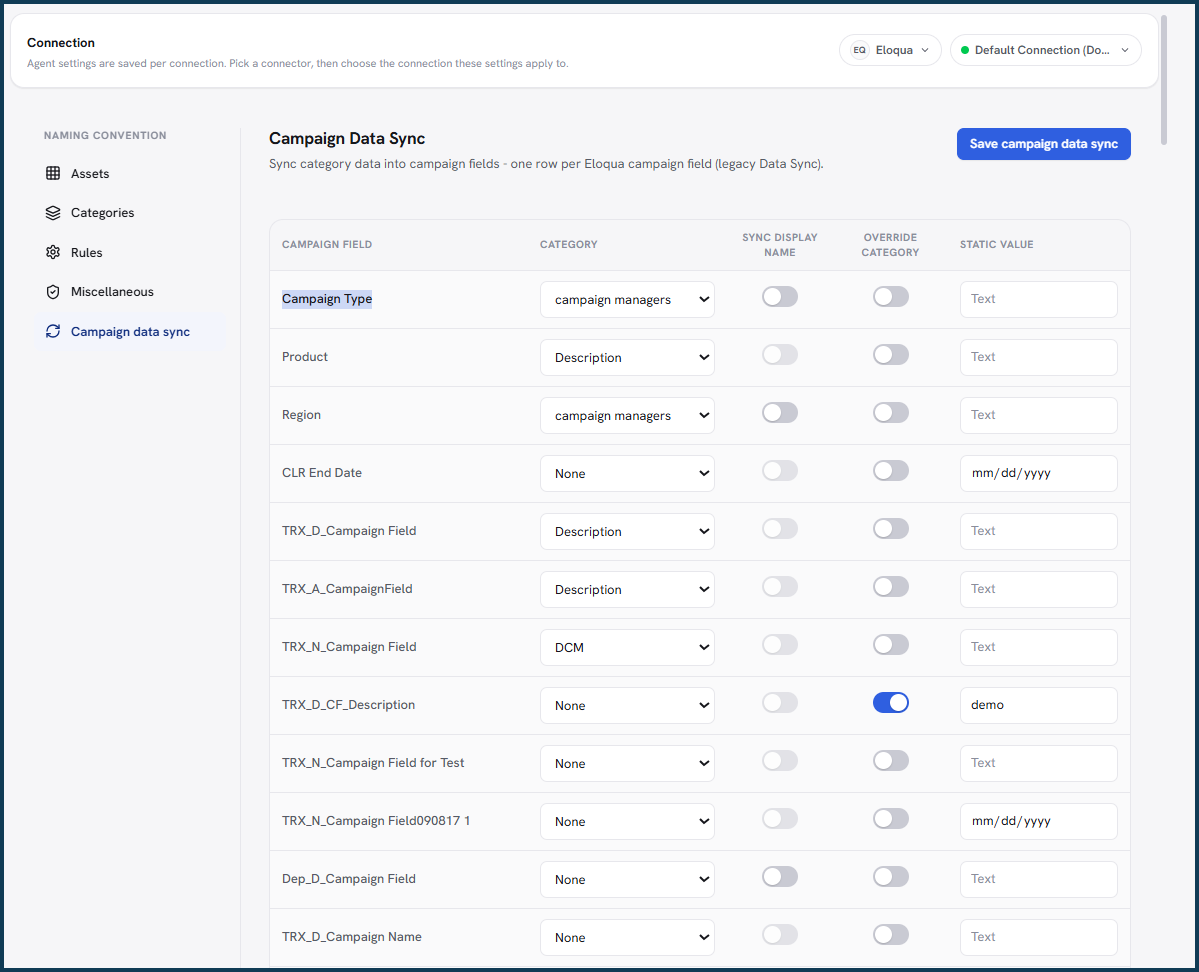
On Eloqua, Naming reads the approved name and writes its values back into campaign fields and custom data objects. Region, product, and campaign type are populated for you, so the structured data behind a campaign always matches the name on it.

  • Dashboards and ROI reports built on fields that stay consistent, campaign after campaign.
  • Less manual field entry for your team, and fewer mismatches to reconcile later.
  • Cleaner segmentation and analysis, because the reporting attributes are always there.
Eloqua campaign fields and custom data objects populated from the approved name — Region, Product and Campaign type — so the structured data always matches the name.

Safety model

Naming prepares. You approve.

Nothing is created or renamed in your live platform without your explicit action. The agent does the preparation; the decision stays with you, every time.

Step 1

Prepare

Naming validates your inputs and assembles the compliant name and asset action.

Step 2

Preview

You see the exact name and the proposed change. Nothing has been written yet.

Step 3

You approve

Creation is confirm-gated; a rename requires you to submit it. The action is yours.

Step 4

Change

Only now does the create or rename reach your live Eloqua or Marketo instance.

Confirm-gated create

New assets are written only after you confirm the previewed name.

Submit-gated rename

Renaming an existing asset requires you to submit the rename form.

Audit trail & CSV

Every create and rename is recorded with the original value and exports to CSV.

Recommendations-only

Turn writes off per connection: Naming validates but never touches the live platform.

Why it matters

The cost of inconsistency shows up downstream

A name looks like a small thing at the moment of creation. Its consequences are not. When the same campaign is represented three different ways, the work lands on the people who report on it, analyze it, and find it later.

Reporting takes longer

Inconsistent names force extra mapping and normalization before anyone can confidently group and compare campaigns, turning a report into a cleanup project.

Attribution gets harder to trust

When the same campaign structure is written differently each time, downstream analysis is harder to interpret consistently, and the numbers get second-guessed.

Asset operations slow down

Poorly named assets are harder to find, organize, and maintain, and bringing them back into alignment becomes its own recurring, manual chore.

Consistent names at creation are what make the downstream work easy: cleaner grouping and attribution, faster reporting, and assets your team can actually find. That is the payoff of getting the name right the first time.

Trust and security

Governed by design, not by good intentions

  • SOC 2 Type II. Independently audited controls for security and availability.
  • Does not store PII. The agent reads what it needs to build and check names and does not retain personal data.
  • Human approval on every write. Nothing is created or renamed in a live system until you confirm it.
  • Works across Eloqua and Marketo today. One naming standard, on both platforms your team already uses.
  • Oracle, Adobe, and HubSpot partner. Built alongside the platforms it runs on.

Governance enforced by the server

The controls that keep you in charge aren't just hidden in the interface, they're enforced by the server. Creating is confirm-gated and renaming requires you to submit the change, every create and rename is recorded in an audit trail that keeps the original value, and each run exports to CSV for compliance. Writes can also be turned off per connection, so a team can run Naming in recommendations-only mode, validating names without ever touching the live platform.

SOC 2 compliant Oracle Eloqua technology partner Adobe solutions partner HubSpot solutions partner

Frequently Asked Questions

What buyers ask about Naming

Does Naming change my assets automatically?

No. Naming validates the name, prepares the asset action, and previews the proposed change. Creating an asset is confirm-gated, and renaming an existing asset requires you to submit the rename form. Nothing is created or renamed in your live platform without an explicit action from you.

Does Naming create its own naming convention?

No. Your organization defines the convention, its categories, required values, field order, vocabularies, and per-asset-type rules. Naming applies and validates that convention. It does not decide your taxonomy or invent naming rules for you.

Does Naming choose the naming values on its own?

No. Users select and provide the naming components, and the name is assembled from your convention. Naming validates the assembled name against your standard, prepares the create or rename, and previews it for your approval. You stay in control of the values and the action.

Can Naming work with our existing naming convention?

Yes. Your organization's categories, required values, field order, vocabularies, and per-asset-type rules are the source of the naming workflow. You author the standard once and Naming applies and validates it every time work runs.

Can Naming rename existing assets?

Yes, when requested and explicitly submitted. Naming finds an existing asset, prepares a compliant name, and previews the rename so older assets can be brought in line with the standard.

It does not silently bulk-fix every non-compliant name on its own, the rename happens only when you submit it.

See your naming standard applied to your own campaigns.

Bring your Oracle Eloqua or Adobe Marketo instance to the demo. We'll configure Naming around your convention and walk through assembling a name, validating it, previewing the asset, and approving the create or rename, on your own setup.